


iCut: Video Editor & Maker
3.8225.00 Reviews
App Specs
- Version
- 1.9.6
- Updated On
- License
- Free
- Downloads
- 500,000+
- Developer
- iCut -Video Editor & Video Maker App
- Categories
- Video Players & Editors
- Platform
- Android
Screenshots
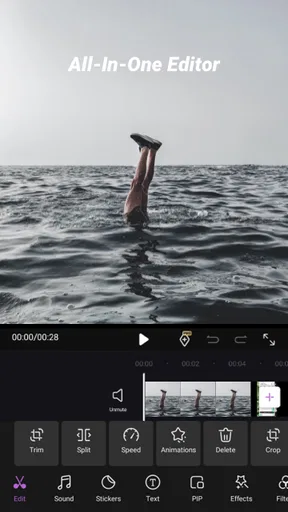
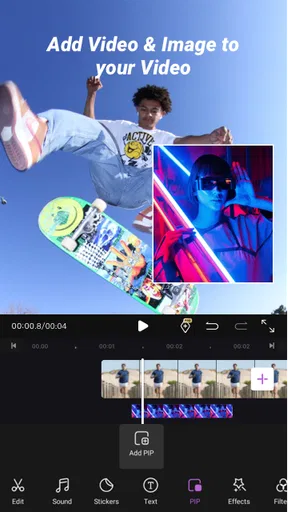

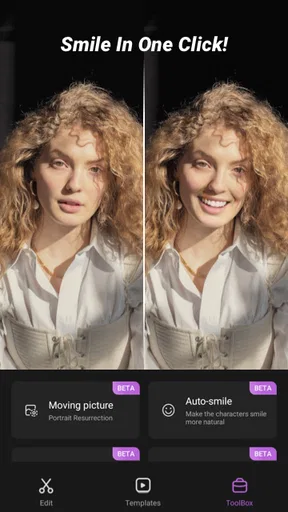
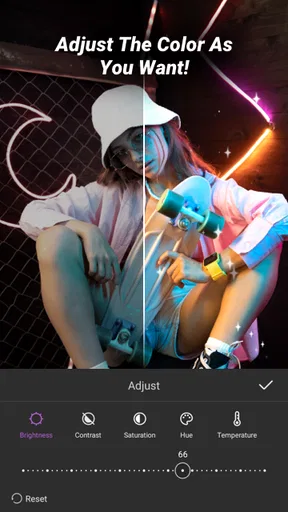


 Analysis by AppCompare
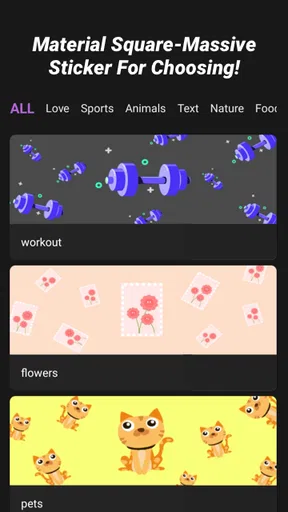
I’d treat a mobile editor as more than a set of effects: the footage often includes personal moments, and a finished clip can be shared far beyond the people who filmed it. That is why I look at both the editing workflow and the choices an app makes visible to its users. iCut: Video Editor & Maker is a free video-editing app from iCut -Video Editor & Video Maker App, with a focus on quick creative touches such as music, filters, stickers, and templates.
A practical fit for quick, personal edits
The appeal here is immediacy. If I have a handful of phone clips and want them to feel more considered before sending them to friends or posting them, an editor built around accessible visual additions can be more useful than a full desktop-style timeline. I would look to iCut for a short birthday montage, a pet video, or a quick recap of a weekend walk—not as the centerpiece of a complex production.
For example, imagine I have several short clips from a family outing. I can first decide what the story is, then choose only the moments that support it, add a restrained filter, and use music to create a consistent mood. The useful discipline is to avoid stacking every available effect: a template or sticker may help establish a playful tone, while too many overlays can obscure the people and details that made the footage worth keeping.
Where it sits among mobile editors
Compared with a simple trimming tool, iCut’s creative ingredients give me more ways to shape the feel of a clip without moving to a computer. Compared with a more demanding editor designed around detailed timing and layered control, its approachable identity is better suited to quick results than intricate, frame-by-frame work. That distinction matters: convenience is a strength when I want a shareable edit soon, but it can become a limitation when a project needs precise control over every cut, sound cue, or visual layer.
I would also think about the destination before editing. A video intended for a casual message can tolerate a playful template; a work presentation or an important archive usually benefits from a cleaner, less trend-driven treatment. Keeping an untouched copy of meaningful footage is a sensible habit, so I can revisit the original later rather than treating one edited version as the only record.
Small decisions that improve the result
A practical workflow is to choose the soundtrack before fine-tuning the cuts. Music affects the pace I expect from the images, so selecting it early can prevent me from spending time polishing a sequence that later needs to be rearranged. If I am editing a clip with speech, I would listen back before adding music and keep the visual treatment simple enough that the person speaking remains the focus.
Templates can save time, but I would treat them as a starting point rather than a finished creative decision. A template may impose a particular rhythm or look, so it is worth checking whether the footage actually fits instead of forcing every shot into the same pattern. Likewise, stickers work best when they clarify a joke or add context; they are less helpful when they cover faces, signs, or other details viewers need to see.
Worth Reading Before You Choose

EA SPORTS FC Mobile 26 Is a Bigger Football Game, but It Takes Time

Flipboard Shows What News Apps Must Do Beyond the Feed

Switching to Android Auto Means Rethinking Your Driving Routine

Google Calendar Makes a Crowded Week Easier to Manage

Ludo King Makes the Most of the Minutes Between Plans

Baby Panda World Brings Quick Play to Modern Phones, but Its Game Library Feels Busy
iCut is free to download, while in-app purchases range from $1.99 to $43.99 per item. I would explore the basic workflow first and pay attention to any purchase prompt before committing, especially if I only need to produce one short video. The app is rated for Everyone, and its average rating is 3.7 from around 1.8K ratings, so I would approach it as a popular option with mixed feedback rather than assume every editor will have the same experience.
Privacy-minded editing habits
Personal footage deserves a little care before it leaves my phone. When I work with family clips, children, or a location that should stay private, I review the finished video from beginning to end, checking not only the main subject but also background details such as a house number or a visible screen. That final watch is useful regardless of which editor I use, and it helps me share deliberately rather than by reflex.
I also prefer to make decisions one step at a time: select only the media needed for a project, check what appears on screen when the app asks for access, and avoid sharing a draft until I am comfortable with its contents. Those are general precautions, not claims about iCut’s data practices or permissions. The app’s stated focus is editing; I would not assume anything about account controls, storage, or privacy handling without checking the choices actually presented on the device.
Who should choose it—and who may want another tool
I can see iCut working well for someone who wants approachable ways to dress up phone footage and is happy to make straightforward creative choices. Its combination of music, filters, stickers, and templates gives casual editors several routes to a more distinctive result. The app has over 500K installs, runs on Android 7.0 or later, and its current version is 1.9.6, which gives prospective users a useful sense of its platform reach and current release.
I would look elsewhere if my project depended on exact audio mixing, elaborate layered composition, or a tightly controlled production pipeline. Those needs call for an editor whose controls are built around detailed adjustments, even if it takes longer to learn. I would also skip a template-led approach when the footage is already visually strong: simple trimming and natural sound may preserve the moment better than extra decoration.
Have you ever found yourself scrolling through social media, watching those slick, perfectly edited videos, and thinking, "I wish I could make something like that"? Well, I’ve got good news for you! Let me introduce you to iCut: Video Editor & Maker. This nifty little app might just be the secret weapon you need to transform your raw footage into cinematic masterpieces.
Simplifying Video Editing
When I first downloaded iCut: Video Editor & Maker, I wasn't expecting much beyond the usual basic trimming and filtering. But oh boy, was I pleasantly surprised! This app packs a punch with its user-friendly interface that's perfect for both beginners and seasoned editors.
Upon opening the app, you're greeted with a clean and intuitive dashboard. The layout is straightforward, so you won't find yourself lost in a maze of options. It’s like having a mini editing suite right in your pocket, without all the complicated bells and whistles that often scare newbies away.
Features That Stand Out
One of the first things I noticed was the sheer variety of tools available. You’re not just limited to cutting and pasting. With iCut, you can:
- Apply a range of filters to give your videos that perfect mood.
- Use transitions to make your cuts feel seamless and professional.
- Add music or voiceovers from their extensive library, or import your own tracks for a personal touch.
- Experiment with speed controls to create slow-motion or fast-forward effects.
- Utilize the picture-in-picture feature for those multi-layered video effects.
Each feature is designed to be as accessible as possible, which means you won’t be spending hours trying to figure out how to make a simple cut or add a transition. The learning curve is impressively gentle.
Performance and Usability
Now, let’s talk performance. I’ve used a fair share of video editing apps that promise the world but deliver laggy, glitch-filled experiences. Thankfully, iCut isn’t one of them. During my editing sessions, I found the app to be incredibly smooth. No crashes, no freezes—just a seamless editing experience.
Another standout aspect is the export quality. Often, mobile editors will sacrifice quality for speed, but iCut manages to balance both. The videos exported retain their crispness and clarity, which is crucial when you’re sharing your creations online.
Access to a Creative Community
One of the features that I found particularly exciting was the community aspect. iCut allows users to connect with a creative community where you can share your projects, gather inspiration, and even pick up a few editing tips from fellow creators. It’s like having a support group of video enthusiasts cheering you on.
The app also offers tutorials and editing challenges, which are a fantastic way to hone your skills and explore new techniques. It’s this combination of community and learning that makes iCut more than just an editing tool—it’s a platform for growth.
Final Thoughts
So, is iCut: Video Editor & Maker worth your time and device space? Absolutely. Whether you’re an aspiring filmmaker, a social media influencer, or just someone who loves tinkering with videos, this app has something for you. It's accessible, powerful, and most importantly, fun to use.
So, next time you're looking to spice up your video content, why not give iCut a try? You might just find yourself creating those envy-inducing videos that you once only dreamed of making. Happy editing!
Pros
- Intuitive interface for beginners.
- Wide range of editing tools.
- Supports 4K video export.
- Includes music and effects library.
- No watermark on exported videos.
Cons
- Limited free version features.
- Occasional in-app ads.
- Requires internet for some tools.
- Subscription model can be pricey.
- Some effects need improvement.
FAQs for iCut: Video Editor & Maker
What features does iCut: Video Editor & Maker offer?
iCut: Video Editor & Maker provides a comprehensive suite of tools for video editing, including trimming, merging, and adding transitions. It also offers a variety of filters, effects, and music tracks to enhance your videos. Additionally, users can adjust video speed, add text, and export videos in high resolution.
Is iCut: Video Editor & Maker user-friendly for beginners?
Yes, iCut: Video Editor & Maker is designed with an intuitive interface that is accessible for beginners. The app provides tutorials and guides to help new users navigate its features easily. Its drag-and-drop functionality and straightforward editing tools make it simple for anyone to start creating videos.
Are there any costs associated with using iCut: Video Editor & Maker?
iCut: Video Editor & Maker is available for free download, but it offers in-app purchases for premium features. These may include advanced editing tools, additional effects, and ad removal. Users can choose between a subscription model or one-time purchases depending on their needs.
What are the system requirements for iCut: Video Editor & Maker?
To ensure smooth performance, iCut: Video Editor & Maker requires Android version 5.0 or higher, or iOS 11.0 or later. It’s recommended to have at least 2GB of RAM and sufficient storage space for video files. Users should also keep their apps updated to the latest version for optimal functionality.
How does iCut: Video Editor & Maker handle privacy and data security?
iCut: Video Editor & Maker prioritizes user privacy and data security. The app requires minimal permissions and does not store or share personal information without consent. All video files are processed locally on the device, ensuring that your content remains private and secure.


